
Google just launched a new security feature to access Google Account. It is called 2-steps verification. With this 2-steps verification, the hacker cannot enter your account only with your hijacked password. They need to enter the verification that will be sent to your mobile phone or generate the verification number using Android, Blackberry and iPhone application.
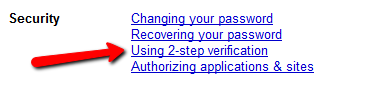
I’ve been using this security technique for my internet banking, which will ask the 2nd verification using a Token device. So instead of using a token device, Google uses SMS verification just like they already do for opening a new Google Account. Here is the screenshot where the 2-step verification activation link is; you can access it from Google Accounts settings:
As Matt Cutts says on his blog, “Is it a little bit of extra work? Yes. But two-step verification instantly provides you with a much higher level of protection.”
But one thing that I worry about with this feature. Sometimes SMS delivery is a little delayed in my country (Indonesia). And I don’t have an Android, Blackberry or iPhone mobile phone. And the Google App to do the authentication is called Google Authenticator which is only available for Android, Blackberry and iPhone. It’s not available for Windows OS nor Linux OS. So if the SMS delivery is delayed and I urgently need any information from my email, I’ll be in a big trouble.
So if you are using Google Account in your everyday life or not, I’m open to hear any comment from you.
More details at Google Official Announcement For this 2-steps verification.