Google+ (read: Google Plus) is one of Google’s products for social networking. Google+ was launched on June 28, 2011 and as I am writing this article, this service is not yet available to the public; only invited users can join Google+. I got lucky and received an invitation from my friends. Google+ uses many of Google’s existing technologies. For example: Google Chat, Google Voice, Google Buzz, Google Profile, Picasa, YouTube, Google Maps, and others. Besides connecting all the dots, Google+ also added some new features such as Circles, Huddles, Sparks, and Hangouts (see it in a nice video presentation at Google+ official).
Google+ Layout
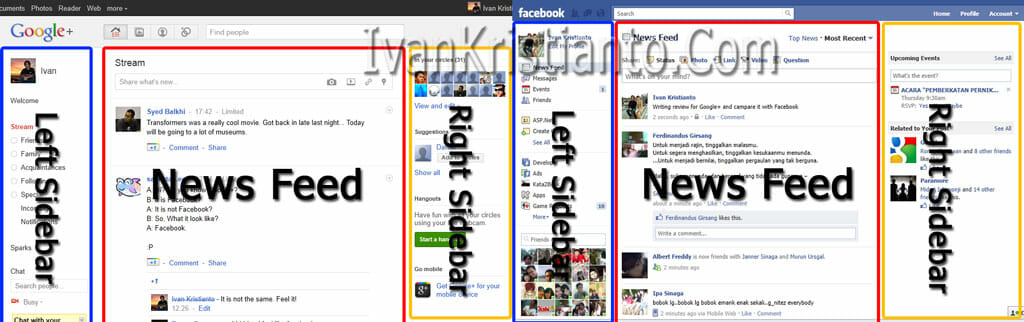
Google+ has a nice and clean layout, even some say it looks like Facebook, including me. They look similar; both have a left sidebar and right sidebar with news and a streaming feed in the center. If Facebook has its river technique (Ajax technology which extends as you scroll down), Google+ requires you to click the more button (same technology as in Google image search). But I like Google+ layout more since it is clean and fast.
Google+ Performance
I am a performance addict, so the first impression when I tried Google+ was that it is fast! And comparing it to Facebook, Google+ is faster. I still haven’t dug into the technology built on Google+ yet. I think they use a caching system like Google Gears (this is just my personal opinion, but I’m sure they use a caching system).
Single Sign On
There’s nothing new with this one. Google+ also uses the Google single sign-on feature. If you sign in with a Google Account, you can access your Google+ at once. I use Google in everyday life, especially Gmail and Google Search. So when I open my Gmail, I can see the top black bar that has Google+ notifications. And I always open my Gmail when I get online. To access Facebook I have to log in again.
Google+ Security and Privacy
As Google+ uses a Google account to sign in, I’m sure that it is secure. But you need to pay attention and keep yourself secure when typing in your account credentials. For privacy, you can easily set it in Google+ settings in the Profile and Privacy section. You can choose whether to put your profile to public or private, your visibility and much more.
Hangout features
This is the feature I like the most from Google+, at least for me. It is a video conference system where you can ask your friends (circles) to join the conference with you. All of you can see each other, talk, chat and watch YouTube videos together. I tried this feature with 2 other friends and the performance was great. No lag and clean, and I got clear voice as well. This Hangout feature is built on Google Voice tech, so you need to install Google Voice on your machine.
Watch the Google+ Hangouts video:
Less Ads and Spam
I HATE SPAM! That’s what I find on my Facebook wall every day. Now Facebook is free ads spam social networking, and it is so annoying. I wish the Google+ team will keep an eye on spamming to keep the quality of their services.
There are a lot of features not covered yet in this article; you have to try it by yourself. And I haven’t tried Google+ from the Android or iPhone app yet. I will review it as soon as I get one. Some say it is like Facebook, and I say IT IS NOT! So how about you?
Note: If you do have a Google+ account, please add me to your circle so we can share the experience together. Thanks.