
[Updated] Multifox doesn’t work anymore. Currently I’m using Firefox Multi-Account Containers, it works like a charm.
For whatever reasons you have in your mind, to open multiple accounts like Facebook or Gmail or any forums, which you cannot do in just one browser. You have to open multiple web browsers — one in Firefox and the other in Google Chrome, like I used to do. You cannot do it in one browser because that browser will store cookies and it will check them in another tab or window.
But there is a magic plugin for you to log in to multiple accounts in different tabs in Firefox. Yes, that’s why I love Firefox. You can log in to multiple accounts in multiple tabs on Firefox using the Firefox plugin MultiFox.
Multifox is an extension that allows Firefox to connect to websites using different user names. Simultaneously! For example, if you have multiple Gmail accounts, you can open them all at the same time. Each Firefox window, managed by Multifox, accesses an account without interfering with each other.
Multifox Installation
- Go to the Multifox homepage and install it. It needs to restart your Firefox after installation.
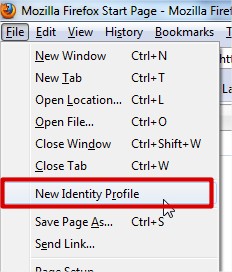
- Here is the magic thing: Go to File and click on New Identity Profile. It will open a new tab or window.
This will open a new window of Firefox. Make note of the 2 at the far right corner of the address bar. You will notice the identity number at your address bar.
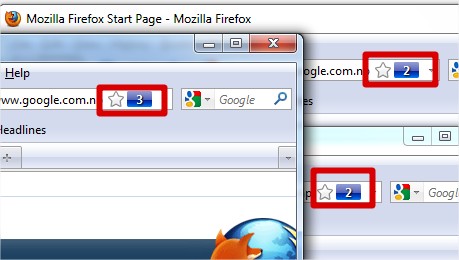
Now you can log in to your multiple accounts.
Even though Multifox stores cookies in different containers, it seems it cannot handle using different connections. For example, logging in to multiple accounts from different socks/proxy. So you still need to use another browser to do this.