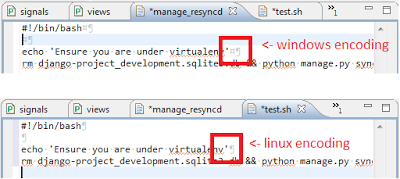
Sometimes when you run your script there is an error like this:
root@server1$ ./script.sh
bash: ./script.sh: /bin/sh^M: bad interpreter: No such file or directory
That’s because there are one or many ^M characters in your script for every newline. This is because you made/edited your script in a Windows environment. Text documents that come from a Windows system won’t always play nice in Linux. The converse is true however. If you create a text file in Linux, many programs will fail to recognize the single LF as a newline and will render the document without any line breaks.
To fix that error you can use the dos2unix script to convert that file into a Unix file. These programs basically do exactly what their name implies: dos2unix takes a file and converts all DOS-style newlines to Unix-style newlines. unix2dos takes a file and converts all Unix-style newlines to DOS-style newlines.
To install dos2unix in Ubuntu:
sudo apt-get install tofrodosTo install dos2unix in CentOS:
yum install dos2unixUsage:
dos2unix [files]
dos2unix script.sh
dos2unix *.php
More info: dos2unix manual page.