This post is largely for my own use. In a few months I may forget how this process functions, and I will want to replicate the method for another project. These notes follow my review after cloning the source repository and reading it carefully.
The post has three parts, and they get more detailed as they go:
- Using it: what it is, how to install it, and what I use it for.
- Real sessions: Observations on occasions I applied or replicated it, along with my impressions.
- How it works inside: the search, the embedding model, and how Google tests the guides. This is the long part. If you only want to use the skill, you can stop before it and jump to What I took from it at the end.
What it is
Modern Web Guidance is an agent skill from the Chrome team, with help from the Edge team and the community. It gives a coding agent (Claude Code, Gemini CLI, Codex, Copilot CLI, Cursor) a searchable library of short guides on how to use current web platform features.
The problem it solves is simple. Models learn from years of old code. Ask an agent for a modal and you often get a div, a focus trap library, and fifty lines of JavaScript, when <dialog> with closedby="any" does the job. Ask for a tooltip and you get Popper.js instead of the Popover API and anchor positioning. The model may know the new API exists, but it has seen far fewer real examples of it.
The skill fixes that by putting the right guide into the agent’s context at the moment it needs it, and nothing else.
At the time of writing (CLI version 0.0.191, October 2026) the package ships 161 guides across 16 categories: accessibility, built-in AI, CSS, forms, HTML, JS, performance, privacy, PWA, security, UI atoms, UI behaviors, UI components, visual design, WebAssembly and WebMCP. The README lists 130 web features covered. In September it was 104 features and 132 use cases, so it’s growing fast.
Two repos to remember:
- GoogleChrome/modern-web-guidance is the published skill.
- GoogleChrome/modern-web-guidance-src is the source: guide content, the build pipeline, the CLI, and the eval harness. This is the one worth reading.
Installing it
The interactive installer detects which agents I have and wires the skill in:
npx modern-web-guidance@latest installAgent-specific options, from the Chrome docs:
# Claude Code
claude plugin install modern-web-guidance@claude-plugins-official

# Vercel's skills CLI
npx skills add GoogleChrome/modern-web-guidance
You don’t have to install anything to try it. The CLI works on its own:
npx modern-web-guidance@latest search "animate a dialog modal backdrop"
npx modern-web-guidance@latest retrieve "animate-to-from-top-layer"
npx modern-web-guidance@latest list
One thing to know: the CLI sends usage telemetry (search queries, guide IDs, latency) to Google. Turn it off with:
export DISABLE_TELEMETRY=1What I use it for
The skill’s description tells the agent to run it first for any HTML, CSS or client-side JS task. These are the kinds of jobs it covers. The next section has the ones I’ve actually run.
- New UI. Accordions with exclusive
<details name>, tab underlines with anchor positioning, cards that respond to container queries, carousels with scroll snap and scroll markers. - Modernizing old code. Swap a custom modal for
<dialog>, a JS tooltip forpopover="hint", a scroll listener for a scroll-driven animation. - Performance. LCP image priority with
fetchpriority,content-visibilityfor long pages,scheduler.yield()to break up long tasks for INP, speculation rules for instant navigations. - Security and auth. Passkeys with WebAuthn, Trusted Types, CSP setup.
The guides also carry Baseline data for each feature. By default the agent treats Baseline Widely Available features as safe and adds the guide’s fallback for anything newer. If a project has its own support policy, the skill tells the agent to read it from CLAUDE.md or AGENTS.md. Something like this is enough:
**Browser Support:** Allow Newly Available features, but only add fallback
code that is 20 lines or fewer and needs no external dependency.
I should add one of these to my own projects. Without it the agent will dutifully add fallbacks I don’t want.
Where I’ve used it so far
Four sessions occurred over the past month. Three involve actual web work: one on this blog (the site you are reading) and two on a client’s WordPress site. The fourth marks where I began replicating the concept. Client details have been removed.
In each one I told the agent to use the skill in my prompt. I didn’t wait to see if it would pick the skill up by itself.
1. A performance and accessibility pass on this blog
I gave the agent five guide IDs up front: optimize-image-priority, improve-next-page-load-performance, defer-rendering-heavy-content, css-layout and accessibility, plus the two cross-document transition guides. It ran list, then retrieve with all of them comma-separated in one call. Later it ran one narrow search on its own: “keyboard focus order follows visual order of flex items reordered with CSS order.”
What came out of it:
- Image priority. The LCP images already had
fetchpriority="high". No change. I like that the guide let the agent confirm this instead of inventing work. - Next-page loading. Links now prerender on hover instead of only prefetching on click, with feeds excluded.
- Deferred rendering. The last two home sections and the later resume sections use
content-visibilityand skip rendering until you scroll near them. No height jump, and keyboard users can still tab into them. - Page transitions. These are cross-document view transitions, where the browser animates from one page to the next on a normal link click. The first attempt was a whole-page cross-fade, and it looked like flicker. For part of the 200 ms both pages were visible at half opacity, and two unrelated layouts double-exposed read as a jump. The fix was a fade-through (old page out in 100 ms, a moment of plain paper, new page in) with the header pinned so it never fades. Pinning the header then broke taps on the mobile menu, which needed its own fix.
axe reported no WCAG 2.2 AA issues afterwards on six templates. The guide got the agent to the right APIs. Making the transition feel right still took me looking at it frame by frame.
2. Site performance on a client WordPress site
Same pattern: list, then one retrieve for the performance hub guide (each category has one overview guide that links to the specific ones) plus optimize-image-priority, optimize-preload-priority, identify-inp-causes, defer-rendering-heavy-content and improve-next-page-load-performance. One extra search for “prerender next page navigation with speculation rules.”
Two findings stuck with me:
- WordPress core already ships speculation rules. It prerenders a same-origin link after a 200 ms hover, with the right exclusions for admin, login, uploads and query strings. The agent checked core’s rule against the guide’s checklist, found it already covered, and only added a more eager prefetch for the header nav links on top.
- The font stylesheet was the real blocker. It got split in two: a 6 KB render-blocking file with only the glyphs the site uses, and a 95 KB fallback for everything else. The fallback starts as
<link media="print">and switches tomedia="all"once it loads, so it never blocks first paint and Chrome fetches it at the lowest priority.
A gotcha to remember: Chrome disables prerendering while DevTools automation is attached (PrerenderingDisabledByDevTools). The agent can see the prefetch happen but can’t watch a prerendered page open. Check that by hand in a normal window under DevTools → Application → Speculative loads.
3. A Core Web Vitals audit on the same site
This one was audit and recommendations only. The agent looped over five searches:
for q in "improve LCP image loading priority" \
         "improve INP interaction responsiveness long tasks" \
         "prevent layout shift CLS" \
         "defer offscreen rendering content-visibility" \
         "responsive images srcset sizes"; do
  npx -y modern-web-guidance@latest search "$q"
done
Then it retrieved six guides, including visually-stable-font-fallbacks and break-up-long-tasks. The fixes that followed:
fetchpriority="low"on a decorative signature image, so core gives the portrait next to itfetchpriority="high"at every width.- A
srcsetfor core images that had no intermediate sizes, so the 1600px original stopped going to every screen. sizeshints written from the rendered width of each image, measured from 360px to 1920px. At 768px wide, one section image went from fetching 1600w to 1024w, which is exactly what its slot needed.
4. Not a use, but a copy
The last session wasn’t a web task. I spent it designing a skill for work that copies this architecture for WordPress conventions: blocks, block themes, performance, security. It’s covered at the end of this post.
What I noticed from using it
- I rarely start with
search. When I already know the area,listplus oneretrievewith several IDs is faster. Search earns its place for narrow questions in the middle of a task, like the focus-order one above. - It’s good at telling me what’s already done. Twice the guide confirmed the existing code was right (LCP priority, core’s speculation rules). That’s worth as much as a new fix, because the agent didn’t rewrite working code.
- Guides get the API right. They don’t make the result look good. The view transition was correct by the guide and still looked wrong. I needed to look at it myself.
- I didn’t measure the skill on its own. I have no before and after Lighthouse numbers from these sessions, and no run of the same task without the skill. So I can say what changed, not how much the skill was responsible for. Google’s evals (section 8 below) are the place that measures that.
How it works behind the scenes
This is the part I actually wanted to remember.
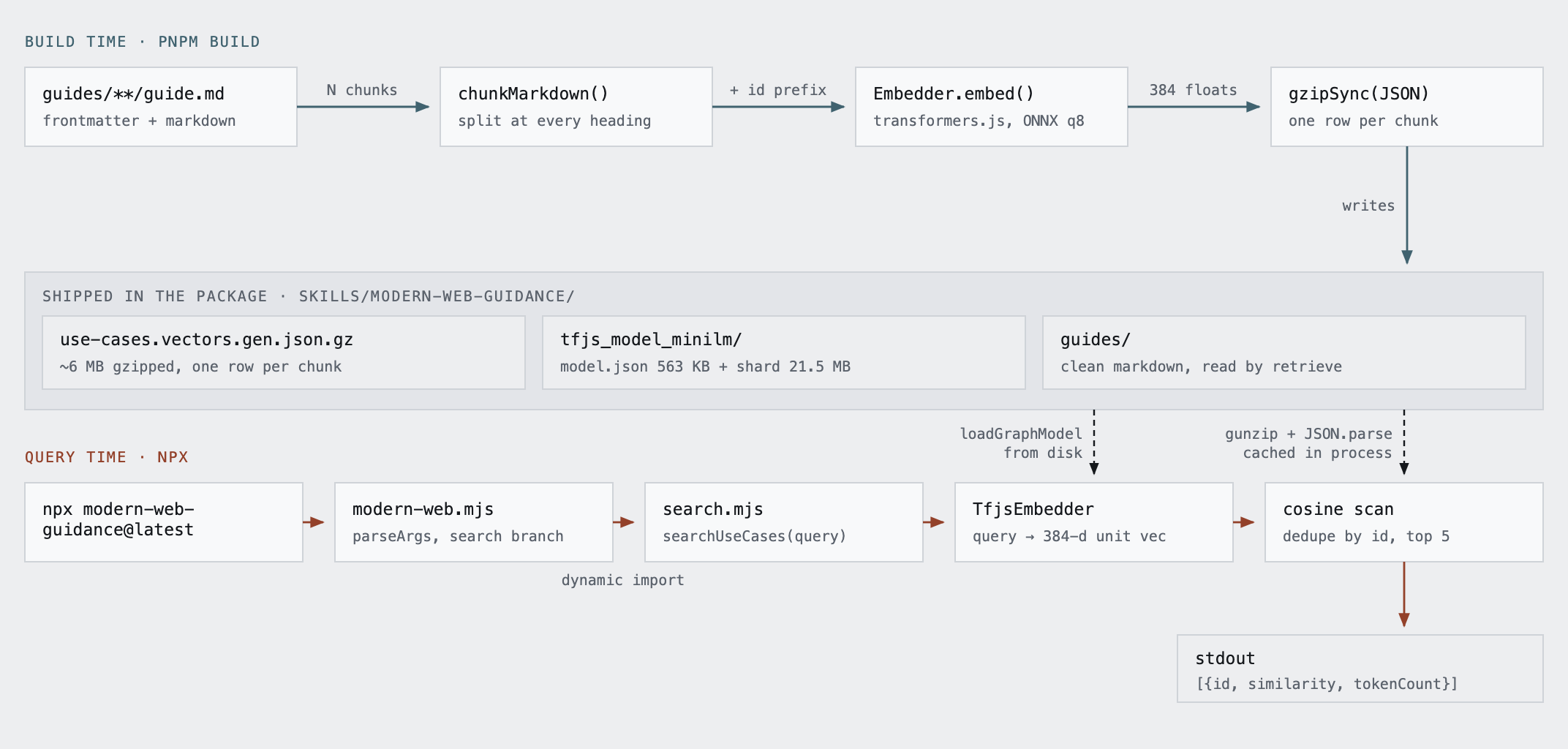
The skill is a small RAG system (retrieval-augmented generation: find the relevant text first, then hand only that text to the model) that runs entirely on my laptop. No vector database service, no embedding API, no API key. A 21.5 MB embedding model and a gzipped JSON file of about 6 MB do all the work.
1. The skill file
SKILL.md is short. It tells the agent three things: search with an action-oriented query, retrieve the guide by ID, then check its own code against the guide before finishing. The search command includes --skill-version 2026_09_04-7de96777, which the CLI compares against its own version to warn on stderr when the installed SKILL.md is stale. Small detail, but it means the instructions and the tool can’t drift apart quietly.
The full library never goes into context. The agent sees five search results, each with a tokenCount, then pulls one or two guides. A typical guide is 1,000 to 3,000 tokens.
2. The guides
In the source repo every guide is a folder:
guides/ui-behaviors/animate-to-from-top-layer/
  guide.md          # the guidance, written for agents
  demo.html         # a gold-standard working example
  expectations.md   # testable assertions, used to generate graders
  targets/...       # generated eval tasks, patches and Playwright graders
guide.md has frontmatter with name, description and web-feature-ids. The body is written for a model, not a person: imperative DO and DO NOT lists, short commented snippets, a fallback section. Authors use macros like {{ BASELINE_STATUS("popover") }} and {{ FEATURE_FALLBACKS("anchor-positioning") }}, which the build expands from the web-features and @mdn/browser-compat-data packages. Browser support data comes from the source of truth at build time instead of being typed by hand.
Here’s a trimmed piece of what retrieve light-dismiss-a-dialog returns, so I remember the tone:
## Constraints & Accessibility

- **MANDATORY**: Use `closedby="any"` to enable light-dismiss declaratively.
- **MANDATORY**: Always open modal dialogs with `showModal()`. This ensures the
  dialog is in the top layer, focus is trapped, and the `Esc` key is handled.
- **DO**: Use `aria-labelledby` or `aria-label` to provide an accessible name.
- **DO NOT**: Use `closedby` for non-modal dialogs (opened with `show()`).

## Fallback strategies

<dialog closedby> has limited availability.
Supported by: Chrome 134 (Mar 2025), Edge 134 (Mar 2025), and Firefox 141 (Jul 2025).
Unsupported in: Safari.
That “Supported by” block is the expanded BASELINE_STATUS macro. The full guide then gives a short click-outside script as the Safari fallback.
3. Building the index
serving/scripts/build-guides.ts turns the guides into the index. For each published guide it:
- Expands the macros.
- Splits the markdown into chunks at every heading (using
marked.lexer), and adds the raw frontmatter as one more chunk. - Prefixes each chunk with the guide ID, category and feature names before embedding. So a chunk about
@starting-styleis embedded asanimate-to-from-top-layer (ui-behaviors)\nFeatures: ::backdrop, <dialog>, ...\n\n<chunk>. Every chunk carries the guide’s identity, which helps a query match the right guide even when it only hits one section. - Embeds each chunk with
Xenova/all-MiniLM-L6-v2through transformers.js. Embedding turns text into a list of 384 numbers, placed so that texts with similar meaning end up close together. That closeness is what search measures later. - Writes everything to
use-cases.vectors.gen.json.gz. Each record holds the guide ID, description, category, features, token count, chunk text, and a 384-number vector.
The current file has 1,628 chunks from 161 guides, about 6 MB gzipped.
The build also hashes the guide files and the build scripts, and skips the whole embedding step on a cache hit. Re-embedding 1,600 chunks on every build would get old quickly.
4. Loading the model
At query time the embedder (serving/lib/tfjs-embedder.ts) loads all-MiniLM-L6-v2 as a TensorFlow.js graph model.
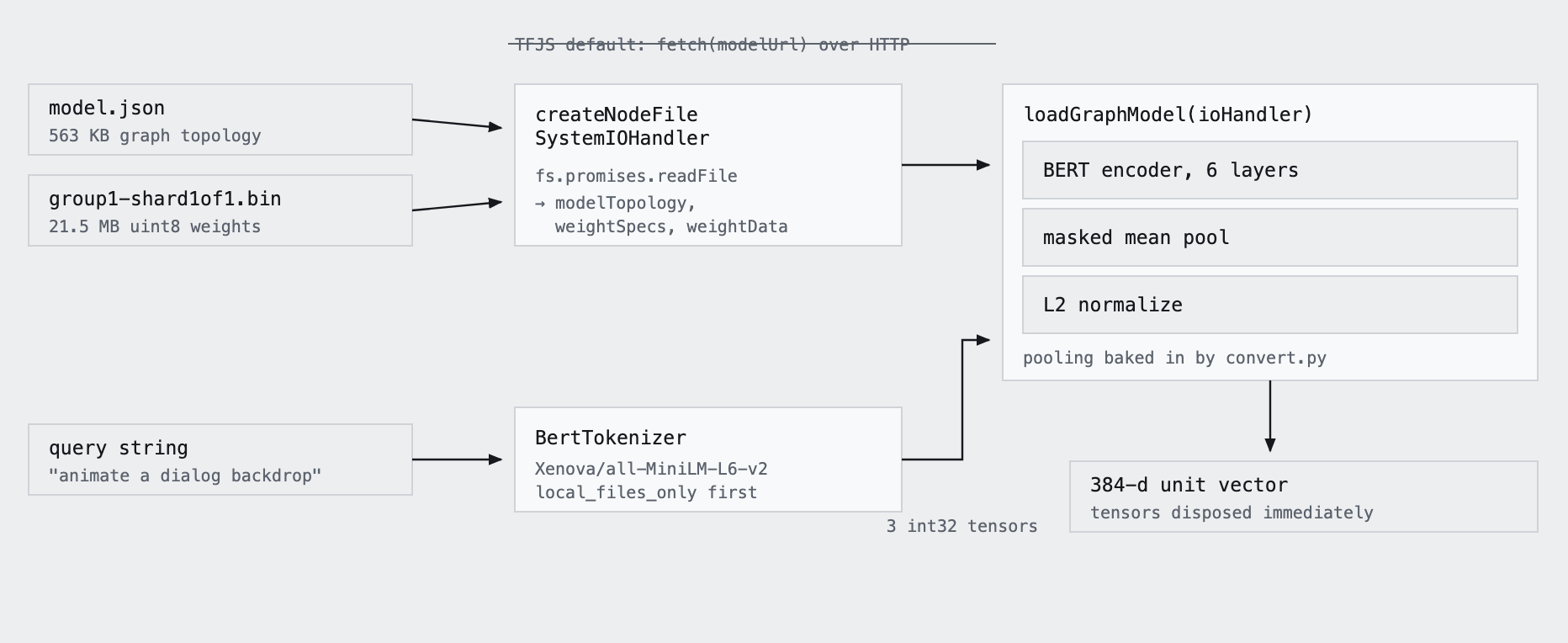
embed() gets a finished unit vector with no pooling code in TypeScript. The struck-through line at the top is TF.js’s default way of loading a model (over HTTP), which the CLI replaces with disk reads.Two terms that come up below. The model produces one vector per token; mean pooling averages them into one vector for the whole text. L2 normalization then scales that vector to length 1, so comparing two vectors only measures direction (meaning), not length.
A few details I liked:
- The model is converted ahead of time.
tfjs_model_minilm/convert.pytakes the PyTorch weights, wraps them in Keras with mean pooling and L2 normalization, and converts to a TF.js graph model with--quantization_bytes=1. That 8-bit quantization is how about 90 MB of float32 weights becomes one 21.5 MB shard. (The README in that folder still says float32. The script and the file size say otherwise.) - CPU backend only. No native binaries, no GPU, nothing for
npxto compile. It runs anywhere Node runs. - Only the kernels it needs. The production bundle swaps in
tfjs-kernels-precise.ts, which registers about 26 CPU kernels instead of the whole backend. A kernel is the code for one math operation (matrix multiply, softmax and so on). This model only uses 26 of them, so shipping the rest would be dead weight. - Tokenizer without the runtime. They use transformers.js only for its BERT tokenizer. To keep
onnxruntime-nodeout of the bundle, esbuild aliases it todummy-onnx.ts, which is aProxythat returns a no-op function for any property. Cheap and effective. Without it, the npm package would drag in a native ONNX binary it never calls. - No network on the hot path. The package carries
tokenizer.jsonin the transformers.js cache location, solocal_files_only: trueresolves on the first run. The model loads through a custom IO handler that readsmodel.jsonand the weight shard from disk instead of usingfetch. - Quiet output.
init()silencesconsole.logandconsole.warnwhile TF.js starts, so backend chatter can’t break the JSON the agent parses.
5. Searching
serving/lib/search.ts is short enough to read in one sitting. The search itself is brute force:
for (const item of cachedVectors) {
  const sim = dotProduct(queryVector, item.vector) / (queryNorm * item.norm);
  if (sim < minSimilarity) continue;

  const existing = resultsMap.get(item.id);
  if (!existing || sim > existing.similarity) {
    resultsMap.set(item.id, { item, similarity: sim });
  }
}
Cosine similarity against all 1,628 chunks, drop anything under 0.3, keep the best-scoring chunk per guide, sort, return the top five. No approximate-nearest-neighbour index (HNSW, FAISS and the like, which exist to avoid comparing against every vector), no vector DB. At this size a linear scan takes a few milliseconds, so anything smarter would be overhead.
The division by the two norms is the standard cosine formula. With this model it changes nothing, because every vector already has length 1 and the dot product alone gives the same score. It keeps the function correct if someone swaps in a model that doesn’t normalize.
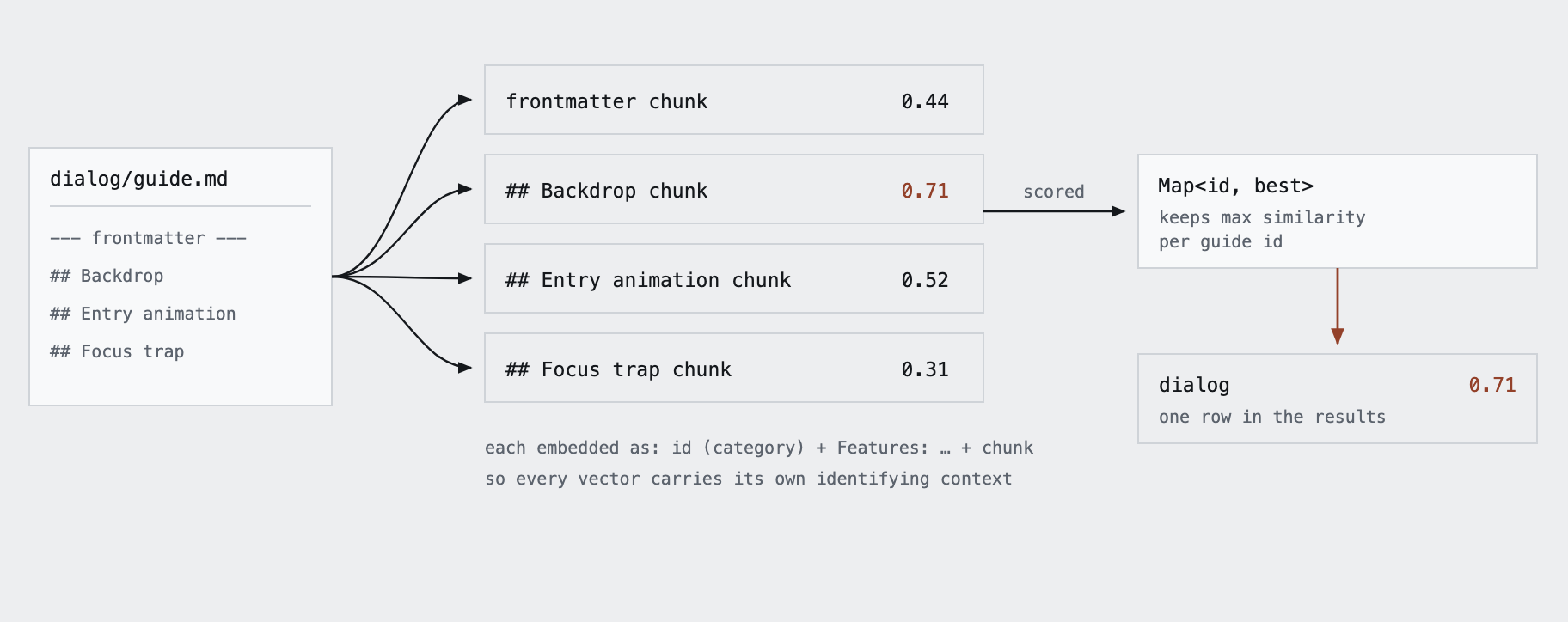
Map is why the results read as five guides instead of five pieces of the same guide. The scores in the diagram are made up for illustration.A real run:
$ DISABLE_TELEMETRY=1 npx -y modern-web-guidance@latest search "animate a dialog modal backdrop"[{"id":"light-dismiss-a-dialog","category":"ui-behaviors","featuresUsed":["<dialog closedby>"],"tokenCount":1092,"similarity":0.703},
{"id":"animate-to-from-top-layer","category":"ui-behaviors","featuresUsed":["::backdrop","<dialog>","overlay","Popover","@starting-style","transition-behavior"],"tokenCount":1947,"similarity":0.6813},
{"id":"declarative-dialog-popover-control","category":"ui-behaviors","featuresUsed":["Invoker commands","Popover","<dialog>"],"tokenCount":3001,"similarity":0.562},
{"id":"html","category":"html","tokenCount":5587,"similarity":0.5471},
{"id":"accessibility","category":"accessibility","tokenCount":7131,"similarity":0.5102}](I trimmed the descriptions.) About 1.2 seconds wall time with a warm npx cache, and most of that is Node starting and loading the model. The output is one JSON object per line on purpose; the CLI source has a comment saying it’s compact so the user can read it in the agent’s output and it costs fewer tokens.
The CLI also loads the embedder with a dynamic import() only in the search branch, and the published package splits it into a separate search.mjs bundle. list and retrieve never pay for the model.
One thing I noticed: the index is built with the transformers.js version of the model (ONNX, q8), while queries use the TF.js conversion with its own 8-bit weights. Same model, two runtimes, two quantizations. The vectors are close enough that cosine scores still rank well, and their RAG benchmark in serving/benchmarks/rag/ compares the variants. Worth remembering if I copy this: use one runtime for both sides, or measure that the two agree well enough.
6. Retrieving
retrieve is boring, which is good. It looks up the ID in a generated TypeScript list and reads guides/<category>/<id>.md from the package. The macros were already expanded at build time, so the agent gets clean markdown with the Baseline status and fallbacks inlined.
7. Publishing
The build output goes to two places, and they don’t get the same files.
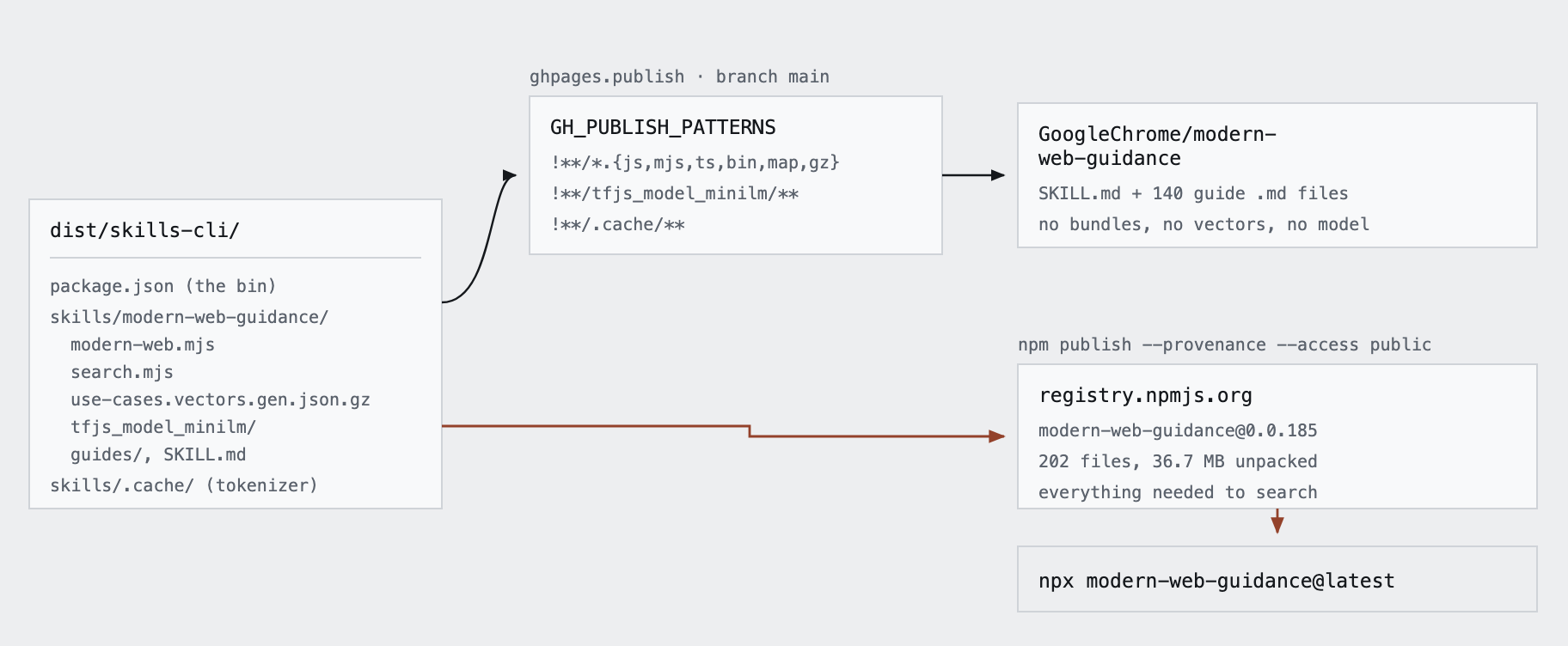
npx downloads. The diagram is a snapshot of release 0.0.185 (140 guides). Today’s 0.0.191 has 161 guides, and the flow is the same.A weekly GitHub Action builds the distribution, tests it, pushes the filtered copy to the public skill repo, tags a release, then runs npm publish --provenance. Reviewing a diff of 140 markdown files is useful. Reviewing a diff of a 6 MB gzipped float blob is not.
8. Proving the guides help
The part that’s easy to miss: they test whether each guide actually changes agent output.
gd is the repo’s own CLI for authors. Each guide has an expectations.md, a plain list of things that must be true if the guide was followed. gd dev then:
- Asks three different coding agents (Google’s internal Jetski or Gemini CLI, Claude Code, and Codex) to implement the guide in two sample apps. These are the golden patches, known-good answers.
- Generates one deliberately wrong answer, the zero-passrate patch.
- Writes a Playwright test (the grader) from the expectations.
- Calibrates the grader: it only counts if it passes every golden patch and fails the wrong one. If not, it regenerates the grader with the failure fed back in.
Then gd eval runs each task twice, once with the skill and once without, grades both with the calibrated grader, and compares pass rates. The README says they use these results to cut content the models already know. That’s why the guides skip basics: anything the model already knows is wasted tokens.
What I took from it
The idea I keep coming back to: a skill doesn’t need to hold the knowledge. It can hold a search tool for the knowledge.
A normal skill is a markdown file the agent reads in full. That stops working once you have more than a handful of topics, because every topic you add costs context in every session. This design keeps SKILL.md small and stable, puts the knowledge in a local index, and lets the agent pull only what the current task needs. Adding guide number 162 costs nothing at runtime.
The pieces are all off the shelf:
- Markdown files with frontmatter as the source of truth.
- Chunk by heading, prefix each chunk with its document’s identity, embed.
- A small sentence-embedding model (all-MiniLM-L6-v2, 384 dimensions) that runs on CPU.
- A gzipped JSON file as the “vector database.”
- Brute-force cosine similarity.
- A CLI with
search,retrieveandlist, run throughnpx. - Evals that compare the agent with and without the guidance.
The core of it is small. search.ts, tfjs-embedder.ts, build-guides.ts, retrieve.ts and practices.ts add up to about 670 lines, and the build script is more than half of that.
Copying it for WordPress
I’ve started on this at work. Our blocks, block themes, performance and security conventions are spread across repos, handbooks and people’s heads, and agents default to whatever WordPress code they saw in training. So I’m building an internal skill with the same shape: task-shaped guides, expectations.md, golden and zero-passrate patches, and calibrated graders.
Some decisions came straight from reading this codebase, and a few go the other way:
- One runtime for embedding. MiniLM through TensorFlow.js at both build and query time, so the index and the query vectors come from the same weights.
- Keyword search alongside vectors. WordPress questions are full of exact names (hooks, functions, block names) that a 384-dimension embedding can blur. So I’m adding BM25, the classic keyword ranking that search engines used long before embeddings, and merging the two result lists with reciprocal rank fusion (each guide scores by how high it ranks in each list). A small retrieval benchmark checks that the mix beats either one alone.
- The skill carries its own CLI.
SKILL.mdruns a bundled script withnodeinstead ofnpx, so a search never depends on the registry or the network. - The built skill is committed under
dist/, so there’s no separate publish step. - Static-first graders. Graders check the code itself first and only reach for a browser when an expectation needs one.
- Guides are self-contained. No live handbook lookups at query time. Handbook changes get ported by hand.
My checklist if I do this again for something else:
- Start with ten guides that fix things agents get wrong today. Write them for a model: DO and DO NOT, short snippets.
- Chunk at headings, prefix with ID and category, embed with all-MiniLM-L6-v2, gzip the JSON.
- Ship search and retrieve as a CLI. Brute-force cosine until it’s measurably slow. Add BM25 if names and identifiers matter.
- Use the same embedding runtime at build and query time.
- Return
tokenCountwith search results so the agent can budget. - Version
SKILL.mdagainst the CLI so stale installs warn. - Write evals early, even a crude with-and-without comparison. Without them there’s no way to know a guide helps.
- Make telemetry opt-in for anything internal.
The same pattern works outside agent skills too. Search over a personal notes folder, or a docs site where the search box runs on the visitor’s CPU (TF.js runs in the browser too). Wherever I have a pile of markdown and want “find the relevant one” without a server, this is the template.