On November 5, 2026 I ran PageSpeed Insights on this blog’s homepage and looked at the Trust and Safety group at the bottom. Four items, all unscored. One said “Ensure CSP is effective against XSS attacks”, and the front end had no Content-Security-Policy at all. It checks script-src, object-src and base-uri, and it has zero weight in the score 1,2, so I could have ignored it. I didn’t want to. If I was adding a strict CSP, I wanted it to stop an injected script for real. I ended up shipping a nonce-based strict CSP that Cloudflare caches along with the page, in Report-Only mode for now.
The short version: the nonce goes on as WordPress prints each script, and Cloudflare caches it together with the header. Every guide says a cached page should use hashes instead. I went the other way on purpose, and the price is a nonce that anyone can read for as long as the cache entry lives.
This post is for my own notes. The policy is in Report-Only mode today, and I want to remember why it looks the way it does when I come back to enforce it.
Why my first strict CSP plan was hashes
This site sits behind Cloudflare APO, which caches the whole HTML page at the edge. Fetch the homepage and you get cf-cache-status: HIT. A nonce is supposed to be a fresh random value for every response, and a cached page hands the same one to every visitor. web.dev says it plainly: use a nonce for pages rendered on the server, and “a hash-based CSP for HTML pages served statically, or pages that need to be cached” 3. So my first plan was hashes.
It fell apart within the hour. The easy way to do hashes on WordPress is an output buffer that hashes every inline <script> in the finished page. That also hashes a script an attacker managed to get into the page, so it protects nothing. Chrome’s modern-web-guidance (I wrote about what that tool is) calls this out in its security guide: “post-processing rendered HTML cannot distinguish developer-authored <script> tags from untrusted <script> tags introduced via reflected or stored HTML injection.”
Doing it properly means hashing each script as WordPress prints it. Inline scripts are fine that way. The external ones are the problem: gtag, Site Kit, the theme bundle, the navigation module. With 'strict-dynamic', a <script src> written in the HTML only runs with a nonce 4 or a hash matched through its integrity attribute. I wasn’t sure how many browsers handle that second route. The fallback is a small hashed inline loader that creates each script element in JavaScript. That loses defer ordering and hides every script from the browser’s preload scanner, and on this site performance comes first. Hashes were out.
What a cached nonce still blocks
So I looked again at what a nonce actually protects on a cached page. The nonce is random_bytes(16), created in the same PHP render that prints the page. Anything that reaches the HTML from the server side, like post content, a reflected value, or a GitHub repo name in the “lately” card on the homepage, is part of that same render. It can’t know the nonce ahead of time, and it can’t carry it. When I edit a post, the site purges Cloudflare, and the next render gets a new nonce. A different URL gets its own render and its own nonce too.
So stored or reflected markup, the usual way a script gets into a WordPress page, still can’t run.
What it doesn’t protect: the nonce is sitting in the cached HTML for anyone to read until the entry expires. A DOM-based injection that doesn’t change the cache key could reuse it, say a URL fragment that ends up in document.write. My own JavaScript has no sink like that (innerHTML doesn’t run the scripts it inserts, and inline event handlers stay blocked whatever the nonce). gtag and Site Kit I haven’t audited.
I know this goes against the spec. CSP Level 3 says the server “MUST generate a unique value each time it transmits a policy” 5, and a 2021 comment on the WordPress core ticket for CSP made the same point: if the nonce is cached with the header, the scripts “cannot be considered secured by CSP, since the nonce will be reused” 6. I’m not alone in making the trade, though. Adobe’s AEM serves a cached nonce from its CDN and says outright that cache hits “will see the same nonce value until cache expiration” 7.
The way to close the gap is a Cloudflare Worker that swaps a fresh nonce into the header and the HTML on every response. Cloudflare has an example of exactly that 8. It means a Worker on the APO route and a deploy outside my two Docker images, so I wrote it down as the upgrade path for when the threat model changes, for example if I ever turn on comments.
Adding the nonce in WordPress 7.1
WordPress builds every enqueued script tag through two functions: wp_get_script_tag() for external scripts and wp_get_inline_script_tag() for inline ones. Both arrived in WordPress 5.7 9, and each passes the tag’s attributes through a filter, wp_script_attributes and wp_inline_script_attributes, so the nonce goes on at print time with no output buffer. Weston Ruter’s Strict CSP plugin uses the same two filters 10. Mine is a small module in the site’s own plugin:
add_action( 'template_redirect', __NAMESPACE__ . '\\send_header', 0 );

function send_header(): void {
	if ( ! is_in_scope() || headers_sent() ) {
		return;
	}
	$policy = Rules\build_policy( nonce(), ENFORCE );
	header( $policy['name'] . ': ' . $policy['value'] );
	add_filter( 'wp_script_attributes', __NAMESPACE__ . '\\add_nonce' );
	add_filter( 'wp_inline_script_attributes', __NAMESPACE__ . '\\add_nonce' );
}

function nonce(): string {
	static $nonce = null;
	$nonce ??= base64_encode( random_bytes( 16 ) );
	return $nonce;
}

function add_nonce( array $attributes ): array {
	$attributes['nonce'] = nonce();
	return $attributes;
}
template_redirect runs only for front-end pages, so wp-admin, wp-login.php and the REST API never get the header. The nonce lives in a static for one request and nowhere else: not in Redis, not in a transient, not in a block cache. The only copy that outlives the request is Cloudflare’s copy of the whole response.
The policy it sends:
script-src 'nonce-…' 'strict-dynamic' 'wasm-unsafe-eval' https: 'unsafe-inline'; object-src 'none'; base-uri 'none'; frame-ancestors 'self'https: and 'unsafe-inline' are only there for old browsers. A browser that understands 'strict-dynamic' ignores both 11, and one that understands nonces ignores 'unsafe-inline' 12. Scripts that my trusted scripts load at runtime, like the webpack chunks for the command palette and the lightbox, run without a nonce under 'strict-dynamic'.
'wasm-unsafe-eval' wasn’t in the plan. I wrote a headless Chrome crawl (pnpm test:csp) that listens for violations on the home page, a single post, the command palette, /articles/ with filters, a 404 and a few more pages. It found one: core’s Interactivity router bundles a module lexer that calls WebAssembly.compile, so clicking a filter on /articles/ raised a wasm-eval violation. With the policy enforced locally, the filters still navigated without a reload, 'wasm-unsafe-eval' allows WebAssembly compilation and nothing else, not JavaScript eval 13, and Lighthouse’s CSP audit reported no findings with it, so I added it.
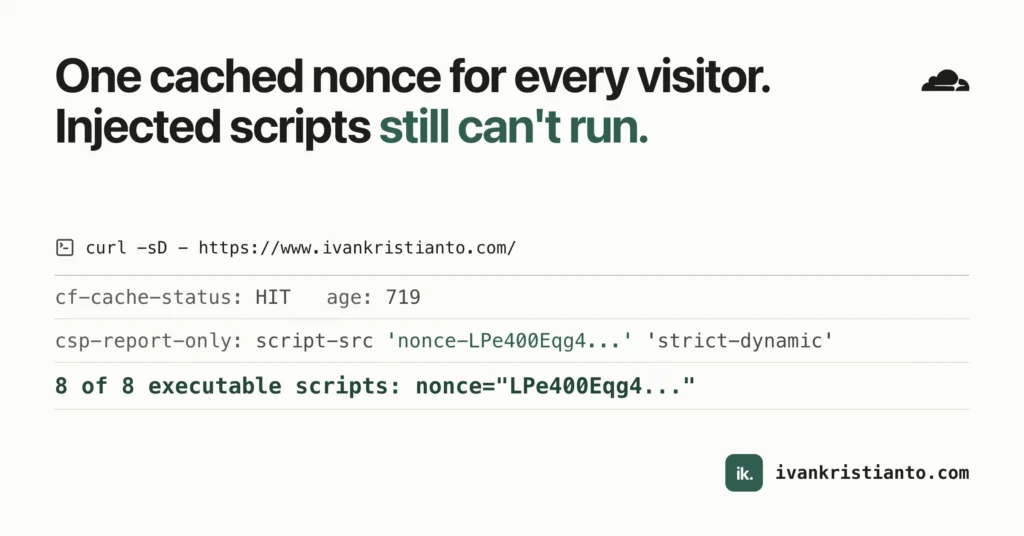
I shipped it as Content-Security-Policy-Report-Only the same day. After a cache purge I fetched the homepage twice. The second response was a HIT, the nonce in the header matched all 8 executable scripts, and the 9th tag without one was Yoast’s JSON-LD, which is data and doesn’t need it:
curl -s -D h.txt -o p.html https://www.ivankristianto.com/
rg -i '^(cf-cache-status|age):' h.txt
rg -o '<script\b[^>]*>' p.html | rg -v nonce
age: 719
cf-cache-status: HIT
<script type="application/ld+json" class="yoast-schema-graph">So APO keeps the header and the body together, and the nonce approach works under it. One thing I didn’t expect: a URL with a random query string went MISS then HIT with its own nonce. Cloudflare’s docs say APO skips the cache for query strings by default 14, so something in my zone changes that. I haven’t pinned down what. It doesn’t change the argument, since a different URL still gets its own render.
What Cloudflare adds, and what’s left before enforcing
curl doesn’t see everything. Cloudflare injects some scripts only for real browser loads, so I ran the crawl against production too.
The Web Analytics beacon gets injected with the nonce from my header copied onto it. No violation. That’s lucky rather than designed. Cloudflare’s CSP reference only tells you which hosts or keywords to add for each feature, never a nonce 15, and the only product I found in its docs that copies your nonce is JavaScript Detections 16. It works today, and it could stop.
Email Address Obfuscation was the one that blocked me. On /contact/ and /resume/, Cloudflare rewrites my email address and adds email-decode.min.js 17, with no nonce. Under enforcement that script would be blocked and both pages would show “[email protected]” instead of the address.
I wanted to keep the setting on, so my first thought was to allow the script in the header. That doesn’t work. A browser that understands 'strict-dynamic' ignores host and path sources 11, and dropping 'strict-dynamic' means listing 'self' and every script my scripts load. On WordPress, 'self' is a hole, because the REST API answers JSONP 18:
GET /wp-json/?_jsonp=foo
content-type: application/javascript
/**/foo({"name":"Ivan Kristianto",...
An injected <script src="/wp-json/?_jsonp=alert"> would pass that policy.
So the address gets encoded before it leaves WordPress. A the_content filter in my plugin runs every address through core’s antispambot() 19, which writes each character as an HTML entity. The browser shows the same address. That was enough for plain text, including 15 old posts that have addresses in code samples like scp username@remotehost.com:file.txt. It wasn’t enough for links. After I shipped it in v0.29.1, a fresh render of /resume/ still had this:
<a href="/cdn-cgi/l/email-protection#4c24…"><span>Email</span><span>hello@ivankrist…</span></a>The text was left alone, but Cloudflare decodes the entities in an href before it looks, so it still rewrote the mailto: link and added its decode script. Cloudflare documents a way out, a pair of HTML comments around the content it should skip 17, so in v0.29.2 the filter wraps each mailto: link in <!--email_off--> and <!--/email_off-->. Since then, fresh renders of /contact/, /resume/, /accessibility/ and the old posts have no rewrite and no decode script. The setting is still on, but on this site it has nothing left to do, and my address is protected only by entities, which a scraper can decode.
Rocket Loader is off, and I’m keeping it off. It rewrites script tags, and people who tried it with nonces report it breaking them.
A few things I haven’t tested. Prerendering from speculation rules can’t be checked by the crawl, because Chrome disables prerendering in any tab a DevTools client drives, so that’s a manual check with DevTools closed. I haven’t crawled production while logged in. I don’t know whether Zaraz is on for this zone (my API token can’t see it), and Zaraz adds its own nonce to the header, but Cloudflare’s 2022 post says it didn’t touch a Report-Only header yet 20, so Report-Only testing might not catch it. Speed Brain is documented as not working with 'strict-dynamic' at all 21.
What I want to do next:
- Find out what breaks when the router’s
evalis blocked. The production crawl after v0.29.2 hit a second violation on/articles/filter clicks: core’s Interactivity router bundles es-module-lexer, which calls(0,eval)to read quoted import names, and'wasm-unsafe-eval'doesn’t cover JavaScripteval. The local crawl never reaches that code. After that, flip the oneENFORCEconstant to send the real header. Report-Only doesn’t clear the PSI item, so that release is the one that matters. - Write a follow-up spec for Trusted Types, which has been Baseline since February 24, 2026 22. The two
innerHTMLsinks I know about are the lightbox (a static SVG string) and the command palette (wrapping search matches). - Build the Cloudflare Worker that gives every response a fresh nonce, so the cached-nonce gap closes.
If you run WordPress behind a full-page cache and want a strict CSP:
- Add the nonce in
wp_script_attributesandwp_inline_script_attributes, never by rewriting the finished HTML. - Write down what a cached nonce leaves open on your site before you accept it. Mine is DOM sinks in third-party scripts.
- Load the site in a real browser before you enforce. Cloudflare adds scripts that curl never sees.
- Ship Report-Only first, and crawl the pages that do the most JavaScript.
Sources
- 1 https://developer.chrome.com/docs/lighthouse/best-practices/csp-xss#csp_targets_xss ↑
- 2 https://github.com/GoogleChrome/lighthouse/blob/21501c1ff777f0c410007ae7f28d7871a29b057f/core/config/default-config.js#L599 ↑
- 3 https://web.dev/articles/strict-csp#choose-hash ↑
- 4 https://www.w3.org/TR/CSP3/#script-pre-request ↑
- 5 https://www.w3.org/TR/CSP3/#security-nonces ↑
- 6 https://lists.wordpress.org/pipermail/wp-trac/2021-October/458134.html ↑
- 7 https://www.aem.live/docs/csp-strict-dynamic-cached-nonce ↑
- 8 https://developers.cloudflare.com/workers/examples/spa-shell/#add-csp-nonces ↑
- 9 https://make.wordpress.org/core/2021/02/23/introducing-script-attributes-related-functions-in-wordpress-5-7/ ↑
- 10 https://wordpress.org/plugins/strict-csp/ ↑
- 11 https://developer.mozilla.org/en-US/docs/Web/HTTP/Reference/Headers/Content-Security-Policy#strict-dynamic a b
- 12 https://developer.mozilla.org/en-US/docs/Web/HTTP/Guides/CSP#inline_javascript ↑
- 13 https://developer.mozilla.org/en-US/docs/Web/HTTP/Reference/Headers/Content-Security-Policy#wasm-unsafe-eval ↑
- 14 https://developers.cloudflare.com/automatic-platform-optimization/reference/query-parameters/ ↑
- 15 https://developers.cloudflare.com/fundamentals/reference/policies-compliances/content-security-policies/#product-requirements ↑
- 16 https://developers.cloudflare.com/cloudflare-challenges/challenge-types/javascript-detections/#if-you-have-a-content-security-policy-csp ↑
- 17 https://developers.cloudflare.com/waf/tools/scrape-shield/email-address-obfuscation/ a b
- 18 https://developer.wordpress.org/rest-api/using-the-rest-api/global-parameters/#_jsonp ↑
- 19 https://developer.wordpress.org/reference/functions/antispambot/ ↑
- 20 https://blog.cloudflare.com/cloudflare-zaraz-supports-csp/ ↑
- 21 https://developers.cloudflare.com/speed/optimization/content/speed-brain/#caveats ↑
- 22 https://webstatus.dev/features/trusted-types ↑