Formatting output strings with String.Format is really helpful, and it’s been mostly used when you develop applications using C# or VB.Net. String.Format was first released in .NET Framework 1.1. String.Format replaces each format item in a specified string with the text equivalent of a corresponding object’s value.
String.Format overload functions:
public static string Format(
	string format,
	Object arg0
)

public static string Format(
	string format,
	params Object[] args
)

public static string Format(
	IFormatProvider provider,
	string format,
	params Object[] args
)
Basic use:
String.Format("Hello {0}", "World"); //Produce: "Hello World"As you see, the argument inside the curly braces {0} is the string format that will be replaced by arg0, which has the following format: {index[,alignment][:formatString]} where: index: index of the arguments given alignment: If alignment is positive, the text is right-aligned in a field the given number of spaces; if it’s negative, it’s left-aligned formatString: string format specifiers.
Another example:
DateTime dt = new DateTime(2010, 10, 15, 12, 47, 5, 0);
String.Format("{0:dd MM yyyy}", dt);  // "15 Oct 2010"
Format specifiers:
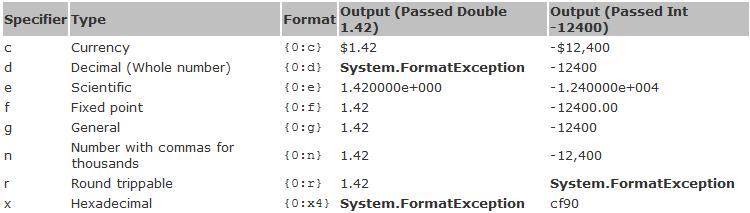
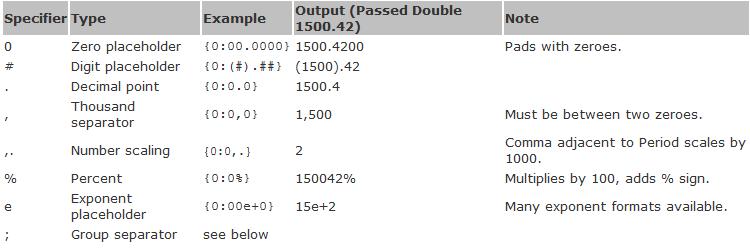
1. Numbers
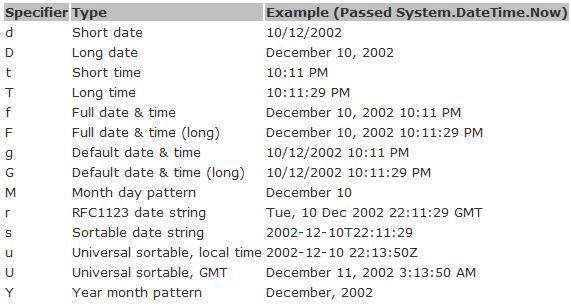
2. Date and Time
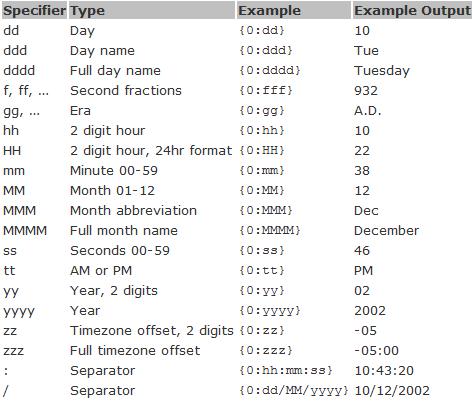
More Examples
Formatting Integer
Add zero before number:
String.Format("{0:000000}", 200);          // "000200"
String.Format("{0:000000}", -200);         // "-000200"
Align number to the right or left:
String.Format("{0,6:0000}", 22);          // "  0022"
String.Format("{0,-6:0000}", 22);         // "0022  "
Custom number formatting for phone number:
String.Format("{0:+### ### ### ###}", 447900123456); // "+447 900 123 456"
String.Format("{0:##-####-####}", 8958712551);       // "89-5871-2551"
Formatting Double
Digits after decimal point:
String.Format("{0:0.00}", 123.4567);      // "123.46"
String.Format("{0:0.00}", 123.4);         // "123.40"
String.Format("{0:0.##}", 123.4567);      // "123.46"
String.Format("{0:0.##}", 123.4);         // "123.4"
Digits before decimal point:
String.Format("{0:00.0}", 123.4567);      // "123.5"
String.Format("{0:00.0}", 23.4567);       // "23.5"
String.Format("{0:00.0}", -3.4567);       // "-03.5"
Thousands separator:
String.Format("{0:0,0.0}", 12345.67);     // "12,345.7"
String.Format("{0:0,0}", 12345.67);       // "12,346"
Custom formatting for negative numbers and zero:
String.Format("{0:0.00;minus 0.00;zero}", 123.4567);   // "123.46"
String.Format("{0:0.00;minus 0.00;zero}", -123.4567);  // "minus 123.46"
String.Format("{0:0.00;minus 0.00;zero}", 0.0);        // "zero"
Formatting Datetime
// create date time 2008-03-09 16:05:07.123
DateTime dt = new DateTime(2008, 3, 9, 16, 5, 7, 123);
// date separator in german culture is "." (so "/" changes to ".")
String.Format("{0:d/M/yyyy HH:mm:ss}", dt); // "9/3/2008 16:05:07" - english (en-US)
String.Format("{0:d/M/yyyy HH:mm:ss}", dt); // "9.3.2008 16:05:07" - german (de-DE)
String.Format("{0:MM/dd/yyyy}", dt);          // "03/09/2008"
String.Format("{0:dddd, MMMM d, yyyy}", dt);  // "Sunday, March 9, 2008"
String.Format("{0:t}", dt);  // "4:05 PM"                         ShortTime
String.Format("{0:d}", dt);  // "3/9/2008"                        ShortDate
String.Format("{0:T}", dt);  // "4:05:07 PM"                      LongTime
String.Format("{0:D}", dt);  // "Sunday, March 09, 2008"          LongDate
String.Format("{0:f}", dt);  // "Sunday, March 09, 2008 4:05 PM"  LongDate+ShortTime
String.Format("{0:F}", dt);  // "Sunday, March 09, 2008 4:05:07 PM" FullDateTime
String.Format("{0:g}", dt);  // "3/9/2008 4:05 PM"                ShortDate+ShortTime
String.Format("{0:G}", dt);  // "3/9/2008 4:05:07 PM"             ShortDate+LongTime
String.Format("{0:m}", dt);  // "March 09"                        MonthDay
String.Format("{0:y}", dt);  // "March, 2008"                     YearMonth
String.Format("{0:r}", dt);  // "Sun, 09 Mar 2008 16:05:07 GMT"   RFC1123
Formatting With IFormatProvider
// format float to string
float num = 1.5f;
string str = num.ToString(CultureInfo.InvariantCulture.NumberFormat);        // "1.5"
string str = num.ToString(CultureInfo.GetCultureInfo("de-DE").NumberFormat); // "1,5"
// parse float from string
float num = float.Parse("1.5", CultureInfo.InvariantCulture.NumberFormat);
float num = float.Parse("1,5", CultureInfo.GetCultureInfo("de-DE").NumberFormat);
More details about String.Format on MSDN Code source C# Examples