Last week I was auditing a client’s multilingual WordPress multisite and found a performance regression on some of the sites. LCP and INP were both up, and Search Console had a group of mobile pages above 200 ms for INP, the line where Google stops calling it good. (INP, Interaction to Next Paint, is how long a page takes to show a response after you tap or click.)
The first thing I found was the font. Its files were big, and most of those pages didn’t need them. The INP side had a different cause: where the font had been cut into files.
The short version: the tool that split the font into small files put a few common English letters, i and j among them, in a different file from the rest of the alphabet. When one word needs two font files, the browser lays it out in more than one pass, and that takes longer. Keep basic Latin in one file and don’t let unicode-range values overlap. There’s a script below to check yours.
This post is mostly for my own notes, so I remember how this works next time. Client details have been removed.
The time went into laying out text
Taps after the page had loaded were fine, and very little JavaScript ran. INP splits every interaction into three parts: input delay, processing duration (your event handlers) and presentation delay (the browser drawing the next frame). Here the time sat in drawing, and the lab traces showed what the browser was busy with: text layout.
A few suspects didn’t hold up. The font’s variable weight, its kerning tables and the plain number of files each explained about a tenth of the slowdown at most.
How the letter i ended up in another file
The site uses a large CJK (Chinese, Japanese, Korean) font, cut into a few hundred small files by cn-font-split, an open-source splitter. Each file gets its own @font-face rule with a unicode-range listing its characters, so the browser only downloads what a page uses. Basic English letters had landed in three of those files, so most English words crossed files.
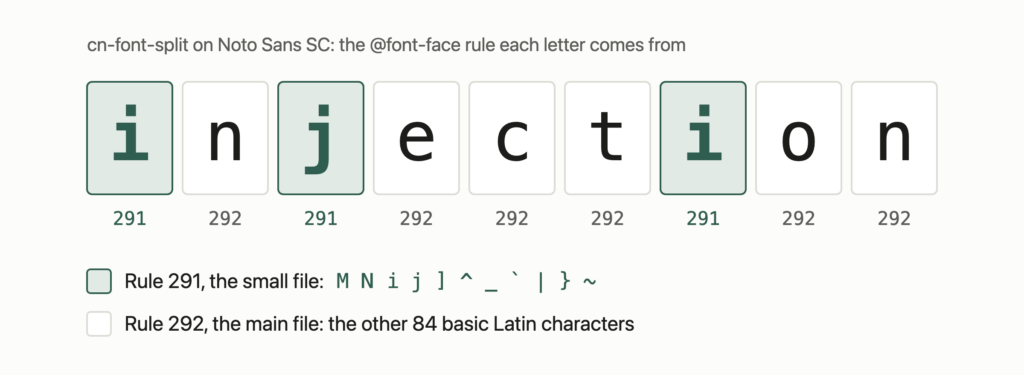
I can’t share that font, but the same tool does the same thing to an open one. Here’s cn-font-split 7.4.3 run with its defaults on Noto Sans SC. It writes 293 files, and the 95 basic Latin characters (U+20 to U+7E) land in two of them. The smaller one holds these 11:
M N i j ] ^ _ ` | } ~So i and j sit apart from the rest of the lowercase alphabet. The script at the end of this post shows which rule each letter comes from:
$ python3 audit.py result.css quick tracing injection
quick      [292, 292, 291, 292, 292] crosses files
tracing    [292, 292, 292, 292, 291, 292, 292] crosses files
injection  [291, 292, 291, 292, 292, 292, 291, 292, 292] crosses files
“injection” switches files five times in nine letters.
Google Fonts does it differently. Its CSS for Noto Sans SC has one latin rule that covers all 95 characters, declared last, after 11 earlier rules that also claim some of them.
Why one word in two files is slower
Before the browser can draw text, it shapes it: it turns letters into positioned glyphs using the font’s own rules. Chromium’s shaper does that one font at a time, and whatever the first font can’t draw goes into a queue for the next. Each file of a split font counts as its own font, so “quick” gets shaped in two passes and stitched back together.
The gap shows up with open fonts too. Layout time for 40 paragraphs of English in Chrome, with the CPU slowed 4x:
Noto Sans, Latin in one file          3.2 ms
Noto Sans, Latin in three files       6.0 ms
Noto Sans SC, Latin in one file       3.3 ms
Noto Sans SC, cn-font-split output    4.7 ms
Arial                                 2.0 ms
Two files cost about 1.5 times as much as one, three files about twice. WebKit (Safari’s engine) shows the same pattern, and on the client’s site the gap was bigger.
The Arabic pages were worse
The site also has an Arabic version. The webfont has no Arabic letters, but it does have a space. With the webfont first in font-family, spaces come from the webfont and letters from a system Arabic font, so every word is shaped in pieces.
The same setup with Noto Sans as the webfont (no Arabic in it either), on macOS:
webfont first, then sans-serif        17.9 ms
Geeza Pro first, then the webfont      7.2 ms
sans-serif only                       15.1 ms
Look at the last line. Taking the webfont out wasn’t enough. On macOS, sans-serif gave Helvetica for the spaces and Geeza Pro for the letters, the same split at nearly the same cost. So the Arabic pages dropped the webfont for a system stack with Arabic fonts at the front, along these lines:
:lang(ar) {
  font-family: "Segoe UI", "Geeza Pro", sans-serif;
}
That means English words on those pages use the system font too.
My first fix made it slower
My first attempt added one clean Latin file and declared it first, ahead of the old slices. Layout got several times slower. Moving that rule to the end of the CSS fixed it.
I never isolated the cause on the real site, but the CSS Fonts spec has a likely one:
If the unicode ranges overlap for a set of @font-face rules with the same family and style descriptor values, the rules are ordered in the reverse order they were defined; the last rule defined is the first to be checked for a given character.
Chromium follows the spec here. It walks the list of faces backwards, with a comment saying later faces override earlier ones. So with the clean file first, any old slice that still claimed basic Latin would be checked before it, for every letter.
You can reproduce this with decoy faces that claim basic Latin in their unicode-range but don’t contain it, like stale ranges left after a re-split:
real Latin file only                          3.3 ms
overlapping ranges, Latin declared first      6.1 ms
overlapping ranges, Latin declared last       3.3 ms
no overlap, either order                  3.4 to 3.7 ms
The text looked the same in every case, and order only mattered when ranges overlapped. So don’t let them overlap, and if you can’t avoid it, declare the face with the real glyphs last, the way Google does.
What went to production
- One file per Western script, cut by our own script instead of cn-font-split.
- Those files declared last in the generated CSS.
- No webfont on the Arabic pages, a system Arabic stack instead.
- Pages without Chinese text no longer load the big CJK stylesheet after the page has loaded.
I don’t have field data yet, so I can’t tell you how far INP moved.
I haven’t tested any of this on a real phone. The lab numbers come from a fast Mac with the CPU slowed down, and they measure layout, not INP: a tap only pays this cost when it triggers a big layout. The Arabic results use macOS fonts, newer cn-font-split versions may cut differently, and the “one font at a time” part comes from reading Chromium’s source, not from tracing a run.
If you serve a split webfont
- Add the web-vitals attribution build first. It reports the tapped element and the three INP parts from real visitors.
- Save your font CSS to a file and run this script on it with a few words from your own pages:
import re, sys

css = open(sys.argv[1]).read()
rules = []
for body in re.findall(r"@font-face\s*\{([^}]*)\}", css):
    m = re.search(r"unicode-range:\s*([^;]+);", body)
    if not m:
        continue
    spans = []
    for part in m.group(1).split(","):
        lo, _, hi = part.strip()[2:].partition("-")
        spans.append((int(lo.replace("?", "0"), 16), int((hi or lo).replace("?", "F"), 16)))
    rules.append(spans)

def owner(ch):  # the last matching rule wins, like in the browser
    for i in range(len(rules) - 1, -1, -1):
        if any(lo <= ord(ch) <= hi for lo, hi in rules[i]):
            return i

for word in sys.argv[2:]:
    owners = [owner(c) for c in word]
    print(f"{word:<10} {owners}", "crosses files" if len(set(owners)) > 1 else "one file")
The numbers are rule positions in the CSS. More than one per word means more than one file.
- If common words cross files, re-split so basic Latin (U+20 to U+7E) sits in one file per script.
- Check that no two rules for the same family claim the same characters. If some must, put the rule for the file that really has the glyphs last.
- If your webfont doesn’t cover a script on your site, put a system font for that script first in
font-familyon those pages. Removing the webfont alone may not help.
Slices also can’t kern against each other, a problem the W3C web fonts group raised in 2020. Incremental Font Transfer is meant to fix that by loading font data in pieces, but it’s still a W3C draft (October 13, 2026).
Sources
- Interaction to Next Paint (INP) (web.dev)
- web-vitals, attribution build (GitHub)
- cn-font-split (GitHub)
- CSS Fonts Module Level 4, the unicode-range descriptor (W3C)
- Chromium at revision 23bbf9e: harfbuzz_shaper.cc and css_segmented_font_face.cc
- Re: Evaluation report, Garret Rieger, public-webfonts-wg (W3C, September 2020)
- Incremental Font Transfer (W3C Candidate Recommendation Draft)