
If you are a computer geek, it’s normal if your computer has more than one operating system. Like my computer, I have Windows Vista, Ubuntu and Backtrack. All in different partitions. And I’m using Grub as a boot manager. But I put Windows Vista as the default boot. Grub gives 60 seconds timeout as default before it boots to the default OS.
But it’s very common for me to miss the Grub menu and automatically boot to Vista. Of course this is a little bit annoying and wastes my time. To solve this you can use iReboot. It’s a free software from Neosmart Technologies. It’s a lightweight tool to help you choose the OS to boot from Windows. Works well in Windows XP, Vista and Windows 7. But this tool is not available on Linux yet. But if you are in Linux and most of the time I want to reboot to Windows, so I don’t need this tool then (at least in my case).
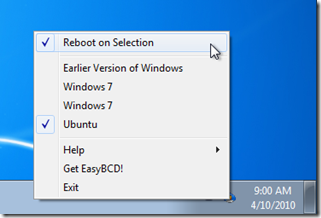
So with this iReboot tool there’s no need to press restart on Windows, wait for BIOS to post and wait until the Grub menu appears and select another OS. All just 2 clicks with iReboot — choose your operating system and press restart.
You can download iReboot here.
It’s that easy, isn’t it?