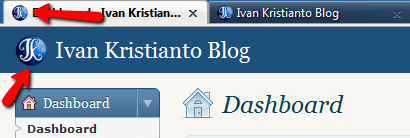
The WordPress dashboard is the WordPress backend to manage your blog. As WordPress is easily customizable, you can add your custom logo and favicon in your WordPress Dashboard page. This can be done by adding a small piece of code in your theme’s functions file.
To add your custom logo to your WordPress dashboard, add this code into your functions.php in your themes folder:
add_action('admin_head', 'custom_logo');
function custom_logo() {
echo '
<style type="text/css">
#header-logo { background-image: url('.get_bloginfo('template_directory').'/images/custom-logo.gif) !important; }
</style>
';
}
You can do the same to add a favicon to your WordPress Dashboard:
add_action('admin_head', 'custom_favicon');
function custom_favicon() {
echo '
<link rel="shortcut icon" href="'.get_bloginfo('template_directory').'/favicon.ico" type="image/x-icon" />
';
}
So now you can customize your WordPress website. For more tips please follow my twitter @ivankrisdotcom.